
Skip to content

How Tenant Connect works

Complete more inspections in one day


  • Liberate your schedule and unlock supreme inspection productivity whether operating remotely or on location.
  • Leverage Tenant Connect's versatility to inspect multiple properties - remotely from the comfort of your home or conducting on-site visits.
  • However you choose to inspect, this game-changing app exponentially increases your daily output.
AdobeStock_813434748-1024x683

Step 1 - Setup in seconds

Download Tenant Connect for free on any device.

The intuitive interface guides you to effortlessly configure all your property details and tenant information in minutes.

Review the in-app onboarding guide to help you set up seamlessly. 

Step 2 - Schedule seamlessly

Invite tenants to inspections with a single tap. 

Choose whether it's a Remote or Onsite, then select the type of inspection: Moving In, Ongoing or Moving Out.

Note that, for the moment, Tenant Connect's Moving In inspections do not cover features related to the minimum standards, health and safety, water and efficiency, and communication setup. 

Tenants have 7 days to respond to a Moving In inspection. This all happens within the app. 

Step 3 - Inspect like a pro

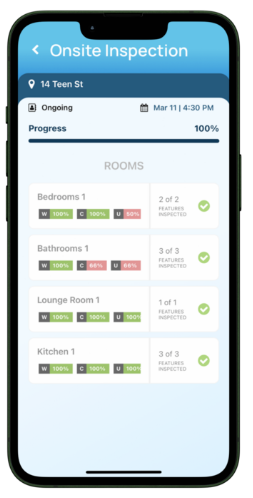
Conduct remote inspections via HD video replicating in-person thoroughness, or use the app onsite.

Guide tenants through properties, capture notes and photos, while assessing conditions in real-time.

Review

Step 4 - Review with precision

After completing the property inspection, review all details within the app.

Ensure you've accurately captured conditions, notes and photos before finalising.
 

report

Step 5 - Automated report delivery

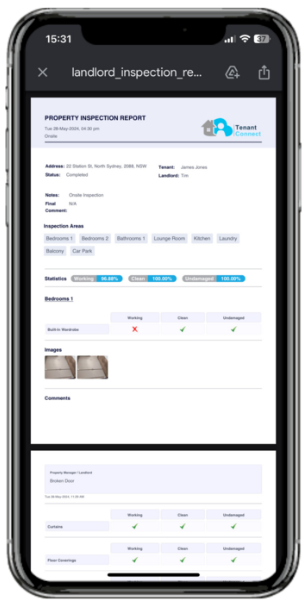
With one click, generate a comprehensive PDF report automatically.

The app then emails copies to you and your tenant for seamless documentation.
 

Completed Inspections

Step 6 - Access all previous inspections

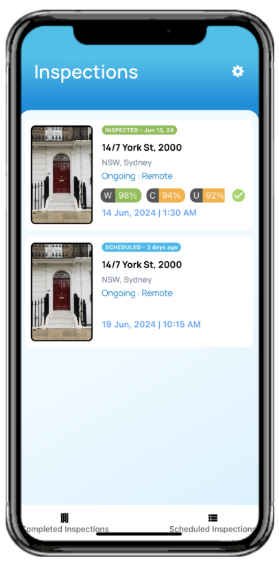
All previous inspections are available to the landlord and tenant within the app, and downloadable as PDF's.

Full visibility and information at your fingertips, anytime.