Buyers Connect: Physical Showing Training
This guide covers:
-
the physical side of running a Buyers Connect showing
-
how to set up, film, and present a remote walkthrough so buyers get a clear, professional view of the property.
It's built for agents who are about to run their first showing, or who want to tighten up a process they've already started using.
You can run a showing on your own, filming the property as you walk through, or with a colleague acting as camera operator while you present. Both are covered here.
Expect to spend around 5 minutes working through this material before your first showing.
Choose Your Format
Buyers Connect showings can be run two ways. Both are fully supported, so choose whichever suits the property and who's available on the day.
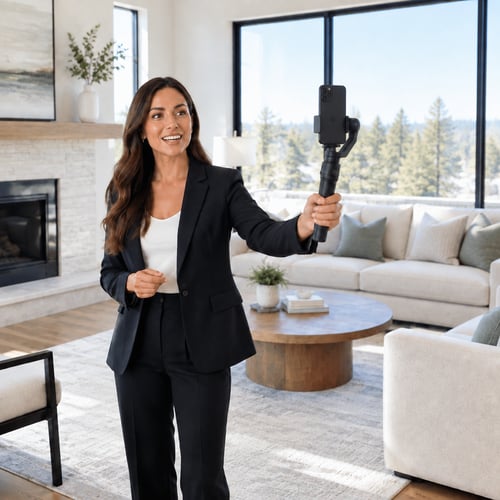
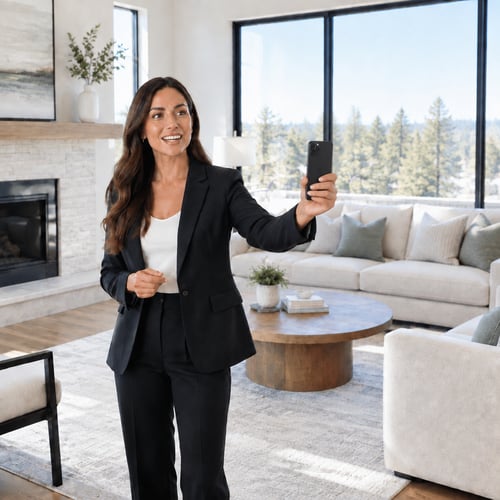
Solo agent
One person, filming the property as they walk through it. No second phone operator needed. Best when staffing is tight, the property is straightforward, or you're comfortable narrating and moving at the same time.
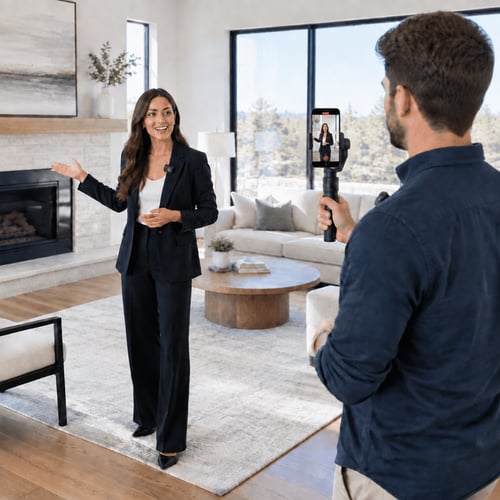
Agent and camera operator
Two people, one presenting, one filming. The agent can focus entirely on talking to buyers and showing the property, while a colleague handles the camera. Best for larger or higher value properties, or when you want the extra polish of a dedicated operator.
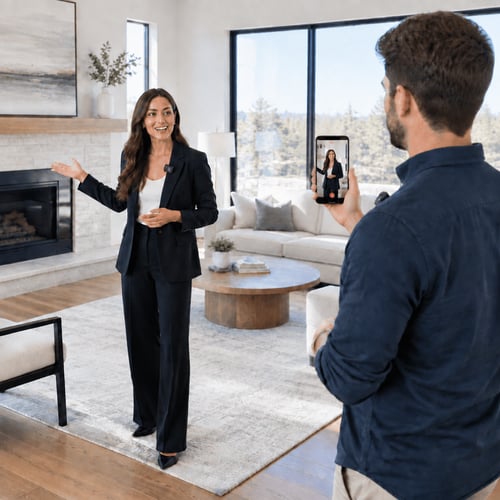
Both formats work well. Pick based on what you've got that day: who's available, how complex the property is, and how comfortable you are being on camera versus narrating from behind the lens.
Gimbal or handheld?
Within either format, solo or two-person, you can film with a gimbal or hold the phone by hand. Both are supported. Here's what to know about each.
Handheld
More flexible in tight spaces, bathrooms, stairwells, narrow hallways, since there's nothing to swing or catch on a doorframe. The trade-off is smoothness: handheld footage needs a conscious, deliberate pace to avoid looking shaky.
Gimbal
Produces noticeably smoother, more professional-looking footage, and takes some of the stabilising effort off the person filming. The trade-off is bulk: a gimbal can be awkward to manoeuvre through tight spaces. Don't be afraid to switch to handheld for those spots and back to gimbal for open rooms.
Audio: the lapel mic is not optional
Whichever filming setup you use, always wear a Bluetooth lapel microphone, clipped to clothing, or hand-held if a clip-on isn't practical. In a two-person setup, both the agent and the camera operator should be wearing one.
Buyers need clear audio as well as perfect video. The phone or gimbal's built-in mic alone will pick up too much ambient room noise, and puts the agent too far from the mic to be heard clearly during a walkthrough.
Before every showing:
- Mic paired and connected
- Battery checked
- Quick sound check, confirm audio levels before you start
Do's and Don'ts
Do
- Move the phone or gimbal slowly and deliberately, rushing is the easiest way to make footage feel unprofessional
- Pause briefly at entry points before moving into a new space, give buyers a beat to take it in
- Narrate continuously, especially in the solo format, there's no second voice or face to carry the moment
- Check your mic is paired and working before you start
- Check in for questions at natural breaks, don't wait until the end
Don't
- Don't walk and talk over your own narration, slow down or pause instead
- Don't rush through rooms to get to the "better" ones
- Don't rely on the phone's built-in microphone
- Don't leave dead silence, especially solo, silence reads as uncertainty on a remote call
- Don't skip the pre-showing equipment check, even for a property you know well
Running the Buyers Connect Showing
This is the live part, from the moment buyers join to the moment you close the call. The training videos (button below) covers it in full; the notes here are what to skim back over before you start.
Agent and camera operator communication
If you're working as a pair, agree on how you'll communicate without it being obvious to buyers on the call. Keep it low-key; a quiet verbal cue, a small nod, nothing that disrupts the walkthrough or draws attention on screen.
Moving through the property
Move at a steady, unhurried pace. A simple, consistent room order helps buyers build a mental map of the property as you go, for example: entry, living areas, kitchen, bedrooms, bathrooms, outdoor spaces. Pause briefly before entering each new space rather than talking while moving through the doorway.
When buyers join
Open with a short, warm welcome that sets expectations for the session. For example:
"Hi everyone, thanks for joining. I'm [name], I'll be walking you through [property] today. Feel free to ask questions as we go, or I'll pause at a few points to check in."
During the walkthrough
Narrate continuously, point out features as you reach them rather than before, and check in between rooms:
"Any questions so far, or should I keep going?"
Mention the practical details buyers actually ask about - storage, aspect, flow, parking, not just the features that photograph well.
Closing the showing
End with a clear next step, don't let the call trail off:
"That's the full walkthrough. If you'd like to see it in person, let me know and we'll arrange a time. Any last questions before we finish up?"
Quick Reference Checklist
Here's a one-page summary to glance at before, during, and after a showing. No need to reread the full guide each time, use this as your refresher.
Before you start
- Format chosen (solo or agent + camera operator)
- Gimbal or handheld decided, based on property and staffing
- Bluetooth lapel mic(s) paired and battery checked
- Quick sound check completed
- Room order/route planned if the property is complex
During the showing
- Open with a warm welcome and set expectations
- Move slowly, pause at entry points
- Narrate continuously, don't leave silence
- Check in for questions at natural breaks
- Mention practical details buyers ask about (storage, aspect, parking), not just the photogenic features
Closing
- Summarise what was covered
- Confirm the next step and who owns it
- Ask for any last questions before ending the call