Schedule the inspection
PM schedules in Tenant Connect. Tenant receives automatic push notification with date and time.
.png "Tenant Connect Logo (900x300)")
Tenant Connect enables live, remote HD condition inspections — your tenant holds the camera, you conduct the full structured inspection from anywhere in the world. Automated reports. Zero travel.

✔️ Remote HD Video & Onsite ✔️ Free for all tenants ✔️ Now available on iOS & Android ✔️ Setup in 10 minutes ✔️ PropTech Award 2025 Finalist
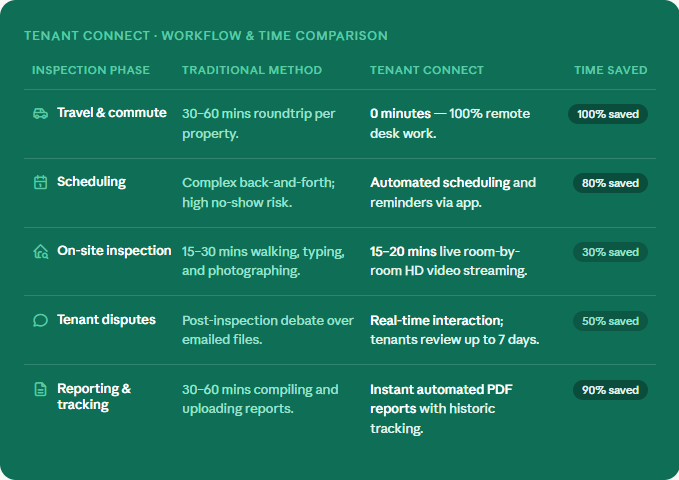
Traditional inspections carry hidden costs that never appear in agency accounts: fuel, scheduling back-and-forth, tenants not home when you arrive, 45-minute manual reports, and disputes months later because the documentation wasn't thorough enough.
Tenant Connect doesn't digitise the traditional inspection. It replaces the entire model. The tenant holds the camera from inside the property. You conduct a fully structured, interactive, room-by-room inspection from anywhere — and receive an automated PDF report when it's done.
to every property — even routine inspections, require 45+ minutes of driving
when you arrive — wasted trip, rescheduling friction, relationship strain
manual inspection reports at the end of an already full day
because photos weren't comprehensive or conditions weren't agreed in writing
that takes more back-and-forth than the inspection itself
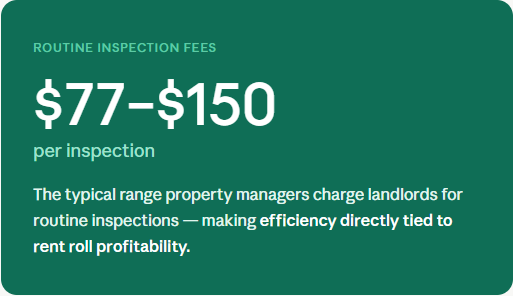
non-deductible for landlords since 1 July 2017 (ATO)
Working? Clean? Undamaged? Tap Yes/No per feature. Structured, consistent, agreed in real time.
High-definition photos from the live video stream — not screenshots. Court-ready quality.
Professional reports generated and emailed instantly. Zero manual write-up. Zero follow-up.
Manage unlimited properties. Each property's data stored separately. No ceiling on size.
The property manager always conducts and controls the inspection. The tenant simply holds their phone as the camera operator. The PM determines all condition assessments (working, clean, undamaged), captures every photo, and submits the report. The tenant never controls the condition record — only the camera feed.
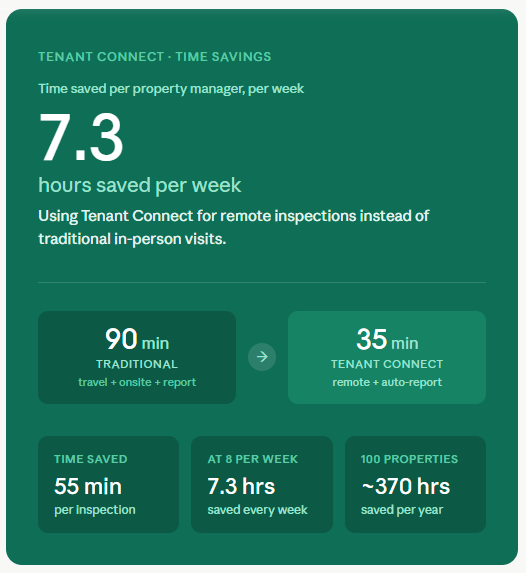
Traditional inspection: 45 min travel each way + 30 min onsite + 45 min manual report = over 2.5 hours per inspection. This is independently validated by a 2026 property management industry guide that found a properly conducted 4-bedroom routine inspection takes up to 165 minutes including travel, the inspection itself, report write-up and owner call.
Tenant Connect remote inspection: 0 min travel + 25–30 min remote walkthrough + 0 min report (auto-generated) = approximately 30–35 minutes. For a PM doing 8 inspections per week, that's 7+ hours saved weekly.
Yes. Tenant Connect works for both remote and onsite inspections using the same structured process. Whether you're physically at the property or on the other side of the country, the inspection is conducted, documented, and reported identically.
For tenants without a smartphone, Tenant Connect's onsite inspection mode is available — the PM attends in person and uses their own device. No tenant device is needed for onsite inspections.
Tenant Connect's reports include timestamped HD photos, real-time condition assessments, instant history lookup, and a 7-day tenant review and acknowledgment. This structure is designed to be comprehensive and transparent.
For specific compliance requirements under your state's tenancy legislation, we recommend consulting your state tenancy authority.
Tenant Connect's remote inspection feature connects property managers and tenants via live HD video — no matter where either party is located.
Scheduling: The property manager schedules the inspection in the app. At the agreed time, both parties log in; the property manager taps "Start" and the tenant receives a push notification to join.
During the Inspection: The tenant must be at the property with their smartphone. The property manager can be anywhere. Both screens display guided prompts so both parties always know which feature is being inspected.
Photos & History: The property manager captures timestamped and watermarked HD photos directly from the live video stream — not screenshots. While reviewing each feature, both parties can also view notes and photos from previous inspections, ensuring full transparency.
Submitting & Finalising: Once all features are inspected, the property manager taps "Submit" to complete the call, then reviews all comments, photos, and assessments before tapping "Finalize."
Automatic Report: Tenant Connect generates a professional PDF report — including all photos and notes — and emails it automatically to both parties.
Add your first property, invite your first tenant, run your first remote inspection — all today. No credit card.
✔️ No credit card required ✔️ Setup in 10 minutes ✔️ Now live on iOS & Android ✔️ Unlimited Properties ✔️ Patents Pending